Realtime visitors
This screen deliberately shows people, not just numbers: every row is a real visit, and one click opens that visitor's timeline. Email and phone appear only when you hold the permission and the person is identified inside your own business.
What this screen shows#
Realtime visitors is a feed of visits: one row per session, newest at the top, holding the sixty most recent. Unlike the other two realtime screens, which aggregate everything, here you watch individual behaviour.
That makes it the right screen for:
- Watching real behaviour in the first minutes of a campaign or a release.
- Reconstructing the path of a customer who just called support.
- Seeing exactly where users stall in a form or a checkout.
- Confirming that a conversion event is recorded with the right value.
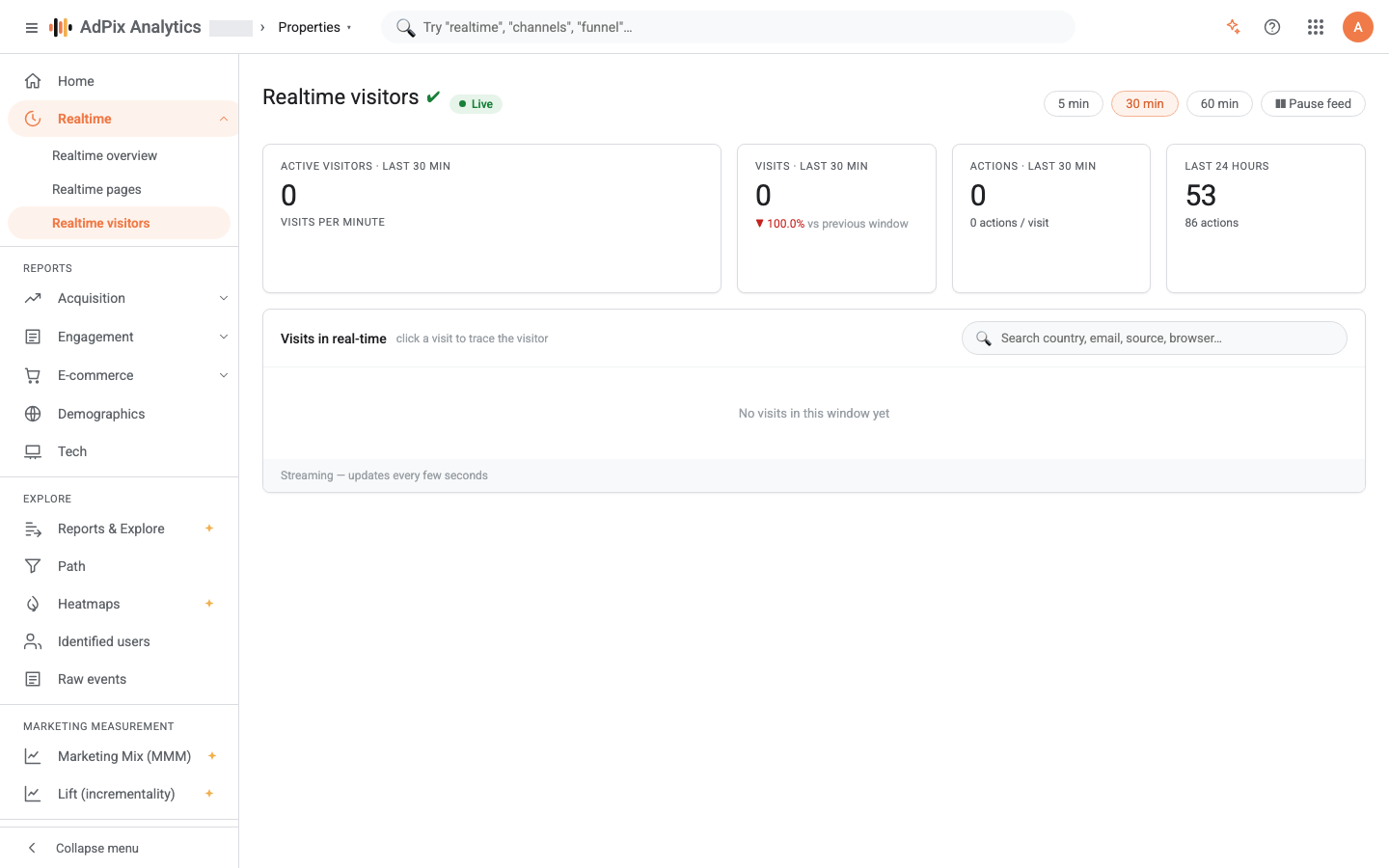
A "Live" badge sits at the top and the page refreshes itself every five seconds. "Pause feed" holds playback so you can read a row without it moving; the badge switches to "Paused" and "Resume feed" brings it back. As on the other realtime screens, the window is 5, 30 or 60 minutes, defaulting to 30.
The four cards#
| Card | Definition |
|---|---|
| Active visitors · last {window} min | Unique people active in the window, with the "Visits per minute" strip beneath |
| Visits · last {window} min | Sessions in the window, with the percentage change against the previous equal window |
| Actions · last {window} min | Events in the window, plus the average number of actions per visit |
| Last 24 hours | Visits and actions over the past day, independent of the selected window |
The last card ignores the window on purpose, to give you a fixed yardstick: when "last 30 minutes" looks thin, the daily figure tells you whether that is unusual or simply a quiet hour.
What each row carries#
Reading across, every visit carries:
- The time of last activity and how long ago that was. That clock is rendered in your own browser's local time.
- A name or visitor handle — either the real email or phone, or
Visitorplus an eight-character ID. - Two tags: Identified or Anonymous, and Returning or New. A visitor counts as returning when they are either identified or their current session is not a brand-new one.
- Technical detail: flag, city and country, browser, operating system and device category.
- Action chips: up to four recent actions from that visit, then "+N more". A page view shows as its path, events carrying a value turn green, and other events show under their own name.
- The channel, with source and medium when present, plus the action count and duration of that visit.
The channel shown here is the value stamped on the event at collection time, not a fresh computation from your current channel rules — the same distinction explained in the Realtime overview.
Search#
The search box above the feed accepts several terms at once, and every term must match somewhere in the row: country, city, email, phone, channel, source, medium, browser, operating system, device, name and the page paths from that visit.
It searches the sixty loaded rows, not the whole dataset. It is a filter, not a historical search.
The per-visitor snapshot#
Click any row to open the side panel. Escape or a click outside closes it.
The panel gives six pieces of metadata — location, channel, device, session count, first seen and status — then "Top events · all time" with the five most frequent events and a total, and finally the activity timeline.
The timeline is grouped by session, newest first, with the current session marked "Live · this visit". Any event carrying a monetary value gets a "conversion" badge. Up to five hundred recent events are loaded.
The timeline's scope depends on identification, and this difference matters:
| Visitor state | What the timeline shows |
|---|---|
| Identified in your business | Every event for that user on this property, across sessions — including the anonymous visits from before they signed in |
| Still anonymous | Only this device's events, keyed on its anonymous ID |
That is why a user's history suddenly looks fuller after they sign in: the identity link attaches their earlier anonymous visits to the same person. The full logic is in How AdPix identifies visitors.
Who can see email and phone#
Read this section in full; this is the one report that can show real identity data by default.
For a row to read as a real email or phone instead of Visitor abc12345, both conditions must hold:
If the first condition fails, the "Identified" tag is still shown — that is a status, not identity data — but the email and phone are not. If the second fails, nobody sees an email, because there is no email to show.
| Role | Access to user identifiers |
|---|---|
| Property admin, account admin, organization admin, organization owner | Open by default |
| Editor, marketer, analyst, viewer | Closed by default, until lifted on the membership |
| AdPix platform admin | Open |
Each time this screen resolves a real email or phone for you, a row marked "sensitive" is written to the audit log. Those rows are your audit trail, and they are exactly what a compliance review asks for.
The four data restrictions and how they relate to roles are covered in Roles and data restrictions.
The boundary between businesses#
Both the identification check and the identity lookup are bound to your property and your business. If the same person also visits another business's site, that identity never crosses over: identity tables are never joined across businesses, and the platform-level link holds hashed values only, never readable text.
Limits worth knowing#
- The feed holds the sixty most recent visits. On a busy site rows leave the bottom quickly; pause the feed to read one.
- Up to thirty actions are kept per visit, and only the first four appear as chips on the row.
- A visitor's timeline goes back at most five hundred events.
- Visits without a session — server-side events, for instance — never appear in this feed, because every row is a browser session.
- Test traffic is not shown.
Frequently asked questions#
Why are most rows just "Visitor" plus a code?
Because that visitor is not yet identified in your business — no email, phone or user ID has been attached to them. Until a sign-in, a sign-up or a form submission records an identifier for them, they are shown only by an eight-character anonymous handle.
I am a property admin but my colleague cannot see the emails. Why?
Because "user identifiers" is a data restriction that sits on the membership and works independently of the role. From property admin upward it is open by default; editor and below see only the "Identified" tag until the restriction is lifted on their membership.
Can this screen show visitors from other businesses?
No. Both the identification check and the email/phone lookup are bound to your property and your business, and identity tables are never joined across businesses. What is shared at platform level is hashed values only, never readable text.
Does the search box search all visitors?
No, only the rows currently loaded in the feed. The feed holds the sixty most recent visits, so search is a filter over the list in front of you, not a search across history. To find one person over a longer period, use the dated reports.
Thanks — your feedback helps us improve the docs.