
Realtime pages
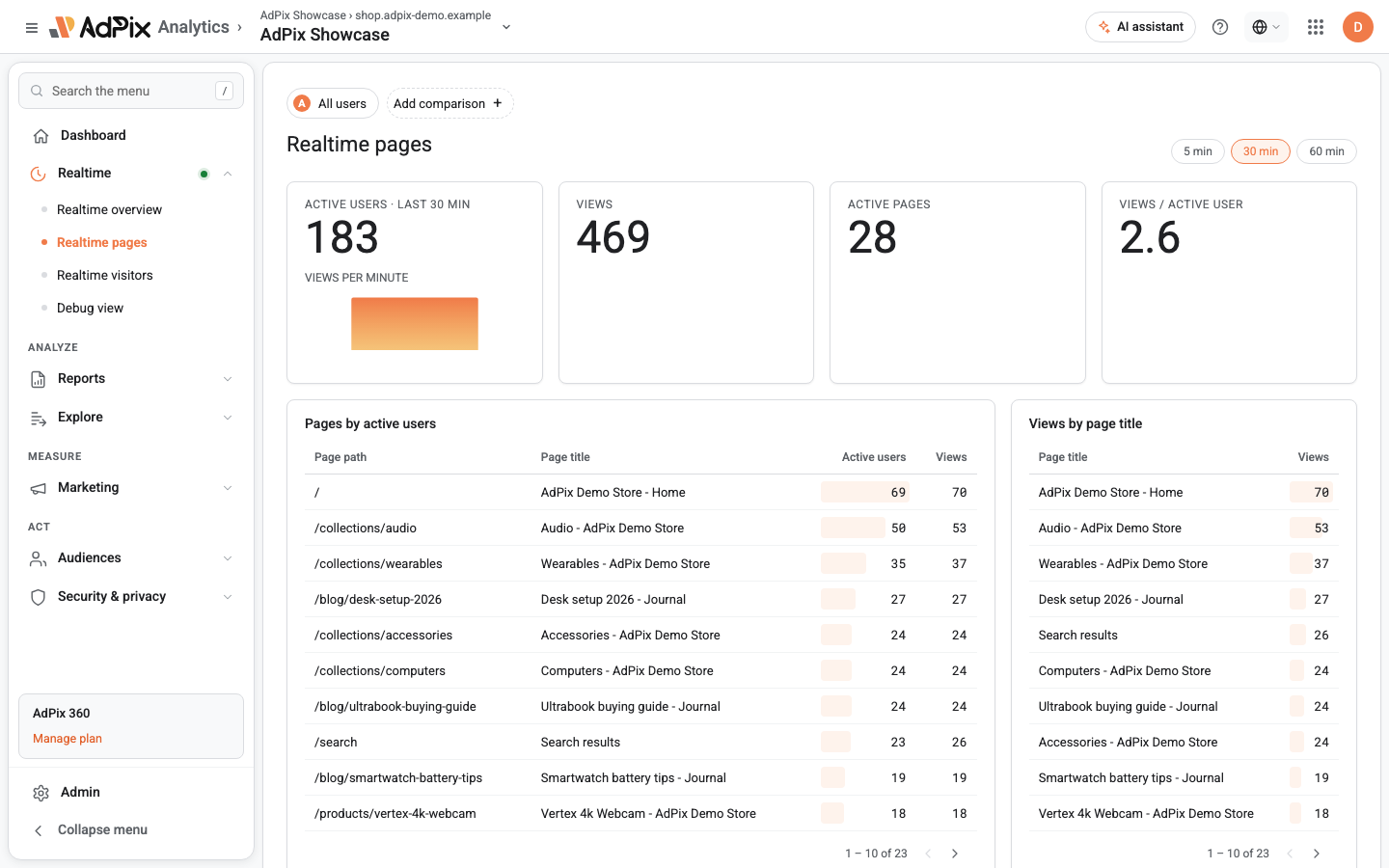
This screen tells you which pages of your site are open right now, how many active visitors each one has, and how views per minute are pulsing. It is the fastest way to confirm a new landing page or find a route that has suddenly gone quiet.
What this screen is for#
Realtime pages does for pages what the Realtime overview does for the whole site: instant confirmation, not analysis.
- You published a campaign landing page minutes ago — is it actually taking traffic?
- You changed a route in a single-page app — does the new path record views, or is the old one still being counted?
- All views suddenly collapsed onto one path — the usual signature of a broken routing hook.
- Is the checkout page still getting views, or has it gone quiet in the last few minutes?
For "the most-viewed pages last month" go to the engagement report. That one has a calendar range, comparison and session metrics; this one has none of them.
Window and refresh#
Like the other realtime screens, three buttons — 5 min, 30 min and 60 min — sit at the top, with 30 minutes as the default. The window rolls against the current moment, the page refreshes itself every five seconds, and there is no date selector here because there is no calendar range involved.
The four headline numbers#
| Card | Definition |
|---|---|
| Active users · last {window} min | Unique visitors who sent at least one event inside the window |
| Views | The count of page-view events in the window |
| Active pages | The count of unique paths with activity in the window |
| Views / active user | Views divided by active users, to one decimal place |
The first two cards each carry the per-minute pulse of their own metric: "Active users per minute" under Active users, "Views per minute" under Views. If the views bars fall away while the active-user bars stay flat, the problem is usually page-view counting rather than traffic.
Hover a card's label to read that metric's definition. For "Views / active user" the definition names exactly what is divided by what.
The Active pages card counts any path with any kind of event in the window — even if that was only a scroll or a click. The table below is built from page views alone. A gap between the two is expected.
The page table#
"Pages open right now" is one measurement you can read at two grains. The Group by switch above the table moves between page path and page title, and both grains show the same two metrics: active users and views.
- Grouped by page path: four columns — page path, page title, active users and views — up to 100 rows.
- Grouped by page title: three columns — page title, active users and views. Views whose event carried no title are not dropped — they roll up into a single dash row, so the totals hold when you flip the grain.
Either way it sorts by active users first, then by views on a tie.
The page path is the URL's path, without the domain and without the query string. Three consequences:
- URLs that differ only in query parameters fold into one row.
- One page served on two subdomains is a single row.
- If your app routes on the hash fragment, every route lands on the same row — the fragment is never part of the recorded path. The full counting rule is in Page views and single-page apps.
The page title is read from the document title at the moment the view is recorded. An event that arrived without one is shown as a dash.
The title grain earns its place when one piece of content is served under several paths — a product reachable through several category routes, for instance. There the title is a more meaningful unit than the path.
If the table is empty but you have active users#
That combination has one clear diagnosis: events are reaching the server, but none of them are page views.
page_view is not in the list, that is your answer.Frequently asked questions#
What is the difference between active users and views in the page table?
Active users counts the unique people who saw that page inside the window; views counts how many times it was seen. One person opening a page three times is one active user and three views, which is why views is always greater than or equal to active users.
Why did `/search?q=shoes` and `/search?q=bags` become one row?
Because the page path is recorded without its query string and without the domain. Every URL that differs only in query parameters folds into one row, and the same page served on two subdomains is also one row.
Why is the page title column showing a dash?
Because that event arrived with no page title. In single-page apps the usual cause is a framework that updates the document title after the page view is recorded. Set the title before the route change.
Why doesn't "Active pages" equal the number of rows in the table?
It need not. The Active pages card counts every unique path with any activity in the window, while the table only lists pages that recorded a page view and fit inside the first 100 rows.
Thanks — your feedback helps us improve the docs.