Overview and severity tiers
The Fraud Protection page tells you how much of your traffic is invalid, which source is worst, and what each verdict asks you to do. It is a premium feature, and before reading the numbers you should know exactly what each severity tier claims.
What the page gives you#
In the sidebar, under the Fraud protection group, a page of the same name sits at /integrity. It is a read-only dashboard: it shows detections, and it has exactly two write actions — changing the sensitivity dial and submitting a false-positive report.
It has five tabs:
| Tab | What it shows |
|---|---|
| Overview | the risk badge, the KPI cards, two donut charts and the 30-day trend |
| Networks | wasted spend by network (ASN) and channel |
| Drill-down | fraud broken down by channel, source, medium or campaign |
| Network rings | clusters observed across independent businesses |
| Entities | the full list of flagged traffic slices |
Fraud protection is not open on the free plan. If your active property is on the free plan the menu carries a premium badge and the page shows an upgrade card instead of the dashboard. Check the property picker at the top of the page first — another property may be on the right plan. Details in plans and entitlements.
The unit of measurement is a traffic slice, not a site#
Everything that gets a score is a traffic slice: the combination of source · medium · channel · campaign · device. The page calls these sources and entities. That grain is what lets you say "this campaign is bad on mobile" rather than only "paid is bad".
At the network level the grain is different — network (ASN) × channel — and that is what the Networks tab does, described in network and ASN fraud.
The header: the risk badge#
Next to the page title is a risk badge that compresses the whole picture into one word. It is driven by the share of flagged sessions:
| Badge | When |
|---|---|
| Low | under 8% of sessions |
| Medium | 8% up to 20% |
| High | 20% up to 40% |
| Critical | 40% and above — or 30% and above when at least one entity is confirmed |
If nothing has been scored yet the badge reads "No data". Scoring is a batch job that enqueues itself roughly once a day; on a new property you wait for the first run.
The KPI cards#
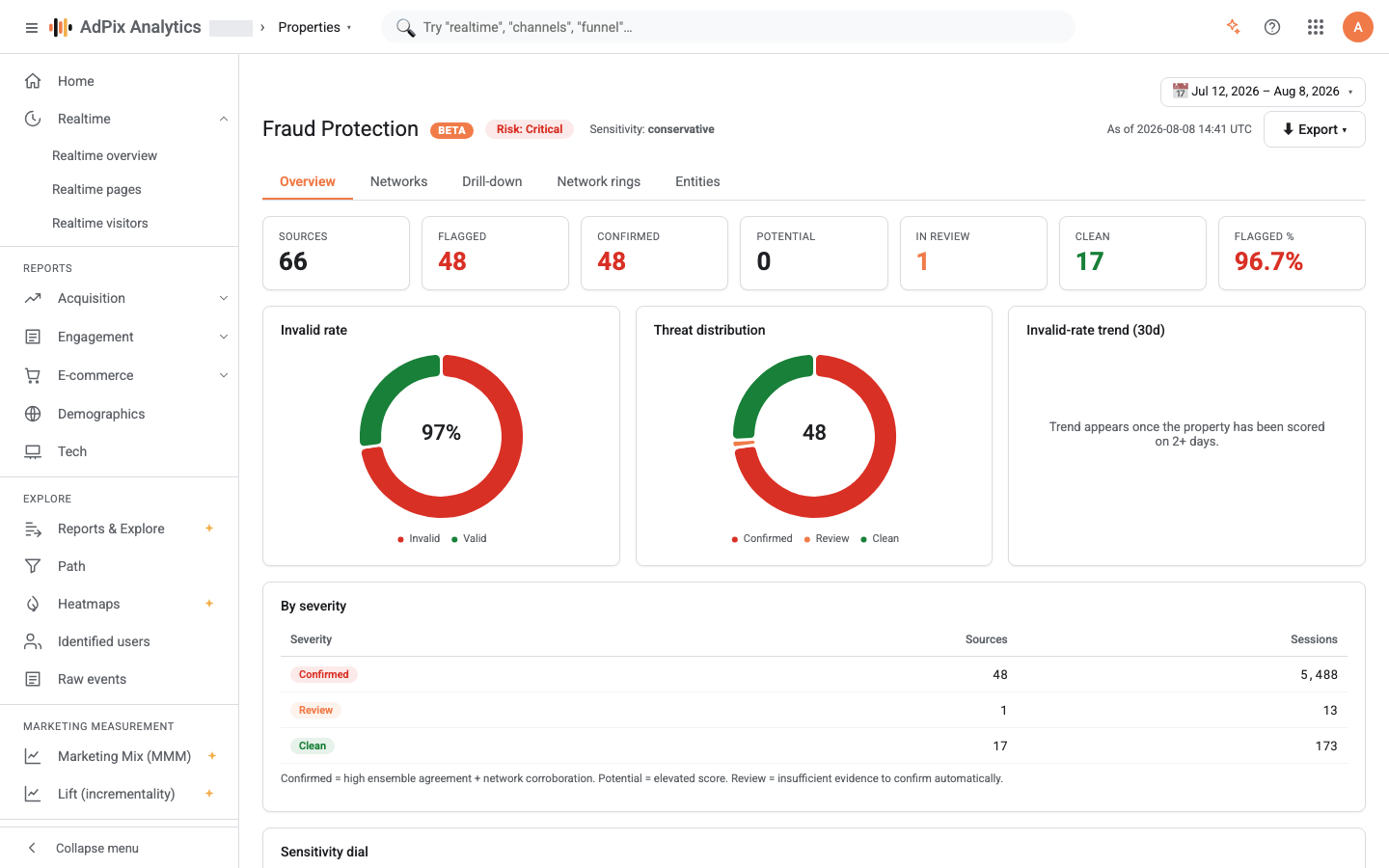
Seven cards sit at the top of the Overview tab:
| Card | What it means |
|---|---|
| Sources | how many traffic slices were scored |
| Flagged | confirmed plus potential |
| Confirmed | slices at the highest confidence tier |
| Potential | credible evidence, short of certainty |
| In review | awaiting a human decision — not counted as invalid |
| Clean | nothing worth acting on |
| Flagged % | flagged sessions as a share of all sessions |
Flagged is a count of slices; Flagged % is a share of sessions. A property can have eleven flagged sources out of a hundred and thirteen and still be under one percent invalid traffic in practice. The number you report upward is always Flagged %.
The two donuts below the cards are those same two views: Invalid rate is invalid versus valid, and Threat distribution splits the same total across the four tiers.
The four severity tiers and what they ask of you#
The page prints the definition itself under the By severity table: "Confirmed = high ensemble agreement + network corroboration. Potential = elevated score. Review = insufficient evidence to confirm automatically."
| Tier | What AdPix is claiming | What to do |
|---|---|---|
| Confirmed | several detectors agree and a structural signal corroborates them | if it is a paid channel, exclude the network or placement and take the evidence for a dispute |
| Potential | there is real evidence, not enough for certainty | investigate; if it is one campaign or placement, cap its budget before making a bigger decision |
| Review | something showed up and AdPix deliberately did not rule on it | look at it. If it is your own traffic, record it so it does not come back |
| Clean | no evidence | nothing to do |
Review is not a weak tier — it is the tier where the product admits it does not know. Most of the guardrails in the next section end up exactly there.
What is never auto-flagged#
These are not tunable thresholds. They are hard rules applied on every scoring run, and no setting turns them off.
- An entity that converts. The bar is 2%, and conversion evidence is not only
purchase: the property's registered key events, session revenue, and the conversion rate rolled up to the source itself all count. That last one matters — the slice grain splits a converting source by device and campaign and can push each piece below the bar; the source-level roll-up prevents it. - That same entity when it also carries a hard structural signal. Key events come from the browser and a bot can fake them, so conversion does not cancel a structural signal. The outcome is review — neither confirmed nor clean.
- A low-volume entity. Below three sessions nothing goes past review on any path. A fingerprint ring needs at least five sessions to confirm and at least three to reach potential. The anomaly model on its own never flags anything below ten sessions.
- An entity that is merely an outlier. The anomaly score is a relative rank and always marks the top decile of any population, including an all-human one. A model-driven verdict is issued only when at least one behavioural signal corroborates it. "You are in the top decile" flags nothing on its own.
- An entity with real engagement. A session with at least ten seconds of dwell, or two page views, or a key event counts as engaged under the standard definition. If at least half of an entity's sessions look like that, model opinion never auto-flags it — review is the ceiling.
- Direct traffic. Direct is the default bucket for unattributed traffic. It is never confirmed or potential on model opinion; only a hard structural signal can flag it.
The 30-day trend#
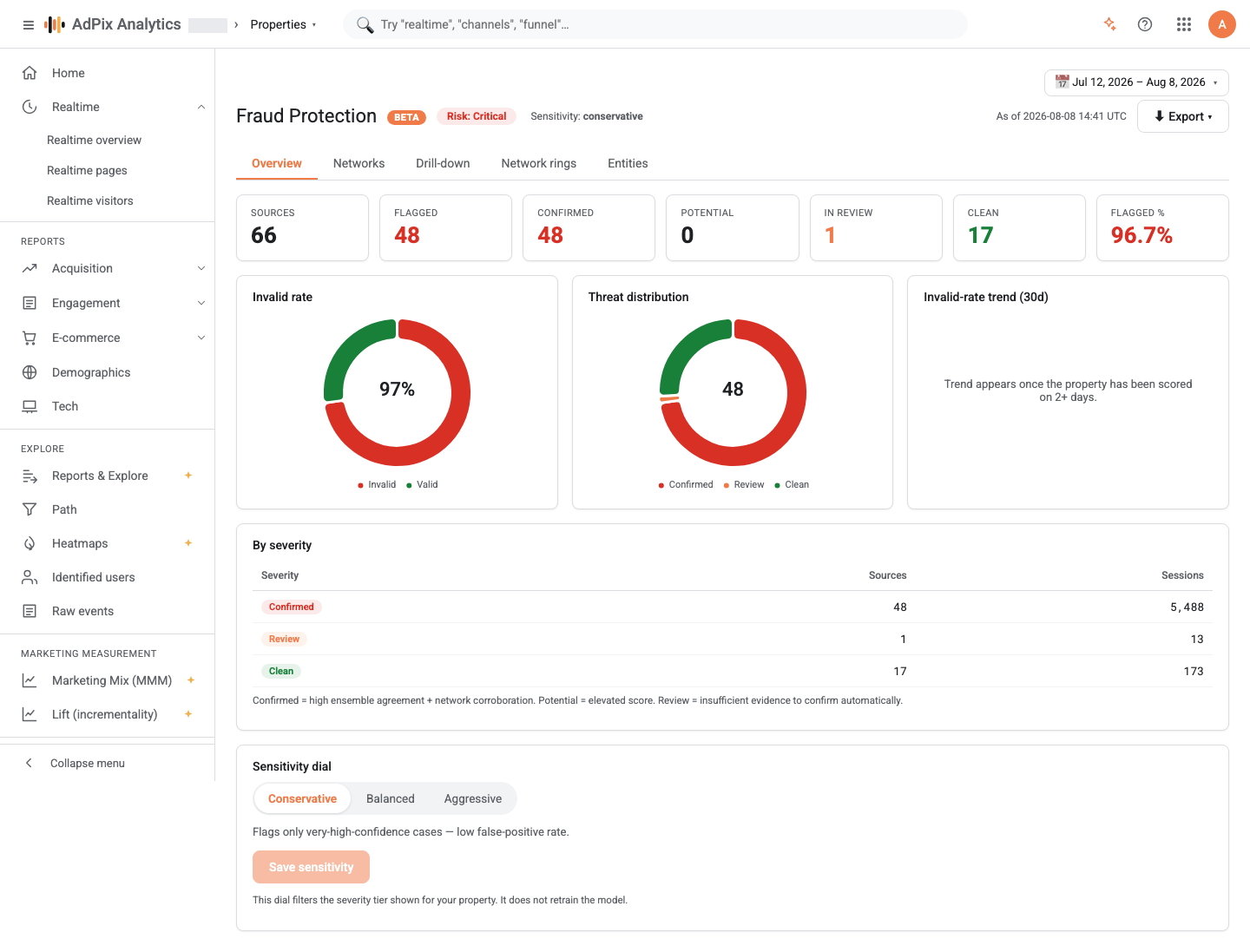
The Invalid-rate trend (30d) chart plots flagged volume as bars and the invalid rate as a line on a shared axis. Until the property has been scored on at least two days you get the message "Trend appears once the property has been scored on 2+ days." instead of a chart.
What to watch for here is a single-day jump, not the absolute level. A high, flat level usually just means that is your channel mix; a sudden jump means something changed that day — a new campaign, a new placement, or a click farm that has just found you.
The main fraud source names a source, not a channel#
On the Drill-down tab you can switch the breakdown between channel, source, medium and campaign and read the table ranked by flagged sessions.
The summary card above it, Main fraud source, always names the worst source, whichever dimension the table is set to. The reason is a real mistake that happened once: when the headline was built from the channel roll-up, one bad source had its rate spread across the whole channel and the headline accused an entire channel — Organic Search — when the problem was a single source inside it. Acting on the channel is almost always wrong; acting on the source is right.
The table is ranked by flagged sessions, so the first row is that main source. Clicking any row opens the detail drawer with the invalid-versus-valid split and the flagged slices under that value — the path described in why this was flagged.
The sensitivity dial#
At the bottom of the Overview tab is the sensitivity dial with three modes:
| Mode | The page's own hint |
|---|---|
| Conservative | "Flags only very-high-confidence cases — low false-positive rate." |
| Balanced | "Default. Balanced recall and precision for most properties." |
| Aggressive | "Flags potential and review-tier entities; higher recall / FP rate." |
Read the Balanced hint carefully: it says "Default", but that is the position the control opens on, not the mode that was applied. A property that has never saved a setting is scored Conservative — the safest of the three — until you save something else. The dial changes the score threshold and how many detectors must agree, and it takes effect from the next scoring run. It does not retrain the model and — worth repeating — it switches off none of the guardrails above. When to move the dial is covered in sensitivity and false positives.
Getting the result out#
The Export button in the header produces a PDF report: the same fraud posture in a form you can attach to an email. For a dispute with an ad network you need the sealed evidence and the refund file instead, covered in blocklist and refund evidence.
If you believe a verdict is wrong, use Report FP on that row in the Entities tab. It does not change the score immediately; it records your report for the platform team, and if accepted the affected sessions are re-evaluated on the next scoring run.
Frequently asked questions#
Why doesn't the invalid rate match the number of flagged entities?
Because the invalid rate is session-weighted, not source-weighted, and it counts confirmed and potential only. Ten small flagged sources out of a hundred can be well under one percent of your real traffic. Review traffic is shown separately and is never counted as invalid.
Why is a channel that genuinely drives sales sitting in review?
Because it also carries a hard structural signal — a fingerprint seen across several businesses, for example. Conversion never causes an automatic flag, but it does not erase a structural signal either, because key events are emitted by the browser and a bot can fake them. Review is the deliberate outcome, so a human decides.
Why does the main fraud source differ from the worst channel in the table?
The summary card always names the worst source, even when you have switched the table to channel or campaign. A channel roll-up dilutes one bad source's rate across the whole channel and blames the channel instead.
What does the sensitivity dial actually change?
The score threshold and how many detectors have to agree. The default is conservative. Hard structural signals fire regardless of the setting, and none of the false-positive guardrails can be switched off by any mode.
Thanks — your feedback helps us improve the docs.