Demographics report
Which country and city your visitors come from, and on what kind of device. The menu calls it Demographics, the address bar says `/geo` — same page either way.
Where the screen is#
In the console's left menu, under the Reports group, choose Demographics. The route is /geo — if a colleague sends you a link to /geo, this is the page it opens.
The page heading is Demographics overview and it holds five blocks:
| Block | What it shows |
|---|---|
| Overview | three headline tiles: Users, Sessions, Views |
| Users by country | a world map, shaded by user count |
| Users by device | a donut of device category (desktop, mobile, tablet) |
| Countries | a table of country, users, sessions — with a Download CSV link |
| Cities | a table of city, country, users |
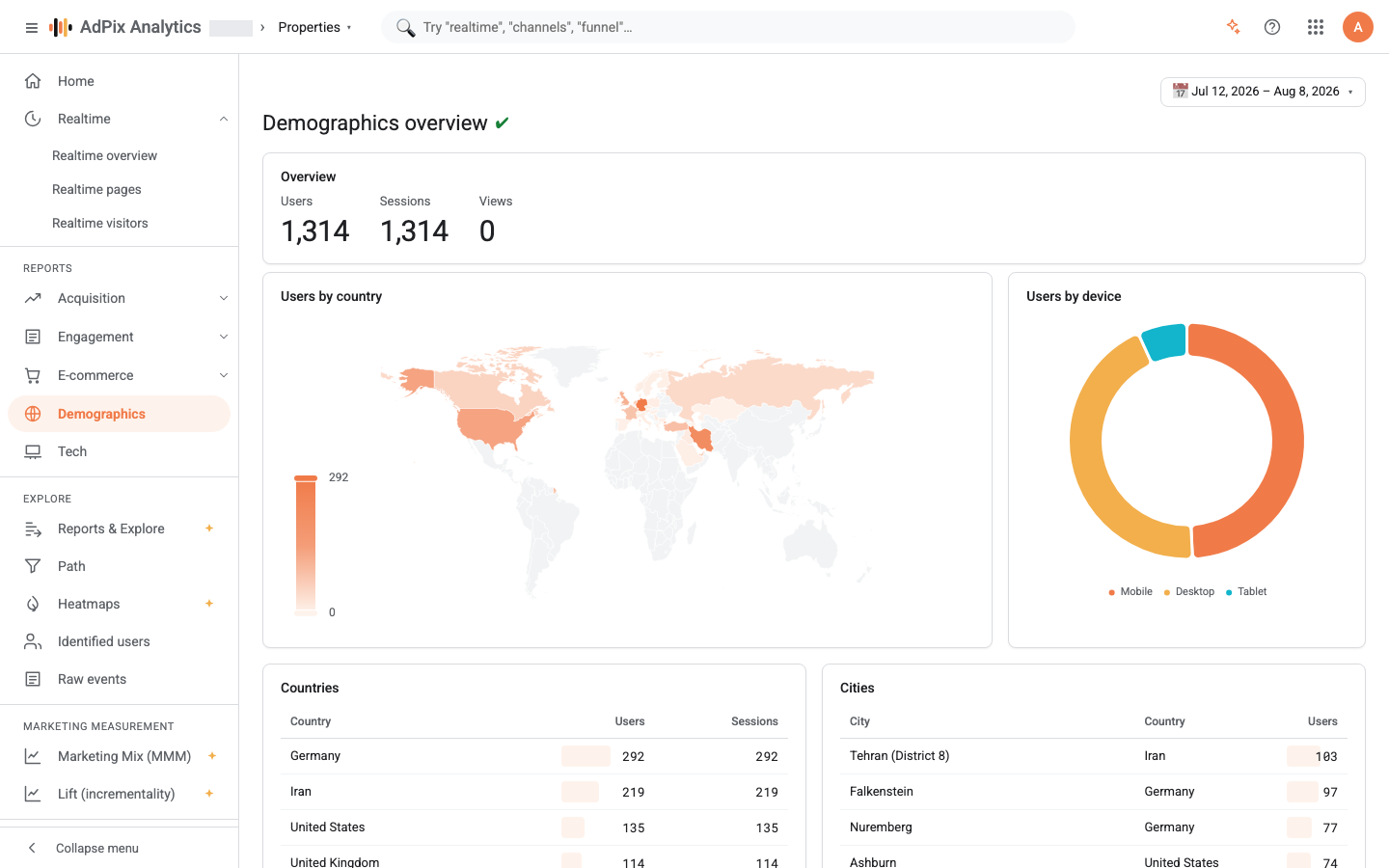
The device donut on this page reads exactly the same data as the Tech report; Demographics carries it alongside location so that answering "how many Iranian mobile users" does not need two screens.
Where country and city come from#
Nothing is asked of the browser and no location permission is requested. The collector looks the request's IP address up against a location database that lives on the collector itself and takes four things from it: country, region, city, and an approximate coordinate — the city centroid, or the country centroid when the city is unknown.
Only the /24 block of the address is retained — the first three octets and a zero. The IP itself is never written to the event table. That sets the ceiling on this report's precision: city level, not visitor level.
Three consequences worth knowing before you act on the numbers:
- VPNs and proxies move the country. A visitor coming through a foreign server is reported at that server's location. That is not a defect; the collector sees what the network presents.
- Mobile-carrier IPs often have no city. Carriers rotate large blocks between cities, so the share of "no city" is structurally higher on mobile traffic.
- With no location database installed on the collector, this page stays empty. Country and city are never filled and the map renders blank — which is not the same as having had no traffic.
Country and city names are localised for display: countries through the browser's standard region list, cities through a curated table covering Iranian cities and the world's major ones, falling back to the English name for anything outside it. The stored value is identical either way.
What the three headline numbers count#
The tiles use the same definitions as the rest of the reports:
| Tile | Definition |
|---|---|
| Users | distinct visitor identifiers seen in the selected range |
| Sessions | distinct sessions; events that carry no session are not counted |
| Views | page_view events only — not every event that fired on the page |
Demographics and Tech count users by each browser's anonymous identifier, not by the unified identity AdPix builds from email and phone. Someone who visits on a phone in the morning and a laptop at night is two users on this screen. For the unified figure, use the reports built on identified users; the stitching logic is in How AdPix identifies visitors.
Second point: server-side events carry no session, and their country is only populated when your server-to-server call passes the visitor's IP in context. Your server's own IP is not a substitute for the visitor's.
What never reaches this screen#
Three filters apply before data reaches the report, all of them deliberate:
- Test traffic never appears in reports.
- Internal IP blocks listed in Admin → Property details → Traffic filtering → Excluded CIDRs are dropped at collection time. If your office range is listed there, it is counted in no country at all.
- A browser holding the exclusion cookie — the one you set for yourself so the team's own visits stay out.
The Countries table returns at most 250 rows and the Cities table at most 200, both ordered by user count. Rows with no country are dropped from the first, rows with no city from the second.
Comparing with a previous period#
Turn Compare on in the date-range picker and each of the three headline tiles gains a percentage change underneath: green with ▲ for growth, red with ▼ for a fall, measured against the same three numbers over the second window.
Comparison lands on the headline tiles only. The map, the device donut and both tables always reflect the primary range. To see how countries shifted between two periods, pull each range separately and put the two CSVs side by side. The four comparison modes are covered in Date ranges and comparison.
CSV export#
The Download CSV link under the Countries table produces a file with three columns — country, users, sessions — up to 5,000 rows. The range and property selected on screen are applied to the file as well.
Two differences from what you see:
- Cities are not in the file. Location export is country level only.
- The country arrives as its two-letter ISO code (
IR,DE), not as the localised name shown on screen.
Column order in this export is not guaranteed and may differ between two downloads. If you feed the file to a script or a dashboard, resolve columns from the header row. And if the range holds no rows at all, the file comes back completely empty — not even a header row.
If the page is locked#
Demographics is included in both plans by default, but a platform administrator can remove any feature from a plan. If you get the premium-feature message instead of the report, check the property picker at the top of the page first — you may be looking at a different property. The full explanation is in A feature is greyed out.
Frequently asked questions#
Why does the menu say Demographics when the URL is `/geo`?
They are the same page — only the menu name and the route differ. The route is /geo, the page heading is Demographics overview, and the console's own search finds it under geo, country, city and demographic alike.
Where does the country come from, and is the full IP stored?
From the visitor's IP address, looked up against a location database that sits on the collector itself. The full IP is never written to the event table — only country, region, city and an approximate city-centre coordinate, plus the /24 block of that IP.
Why don't the country rows add up to the headline number?
Two reasons. Rows with no country are dropped from the table, and the table is capped at the 250 busiest countries. And one visitor can legitimately appear from two countries within the range — travel, a VPN, a mobile network — counting in both rows but only once in the total.
Why is the city empty when the country is not?
The location database almost always resolves a country but frequently cannot resolve a city, especially on mobile-carrier and corporate IP ranges. Events with no city are excluded from the Cities table, but they are still present in the Countries table and in the headline numbers.
Thanks — your feedback helps us improve the docs.