Audiences and destinations
An audience is the definition of a group of identified users; a destination is the system that group is delivered to. Membership is never stored — it is recomputed from the data every time — and activation is a one-shot export, not a continuous sync.
Two halves of one job#
Activation in AdPix comes in two pieces, built in two different places:
- The audience — the definition of the group. In the sidebar under Activate, the Audiences page at
/audiences. - The destination — the system the group goes to. Created under Admin → Integrations & CRM modules, not on this page.
With no enabled destination, Activate stops with "No destinations configured." Build the destination first.
Audiences is not open on the Free plan. If your active property is on Free, the menu item carries a Premium feature badge and the page shows the Upgrade plan card instead of the builder. Independently of the plan, the item only appears in the sidebar for someone holding the edit-audiences capability.
Build an audience#
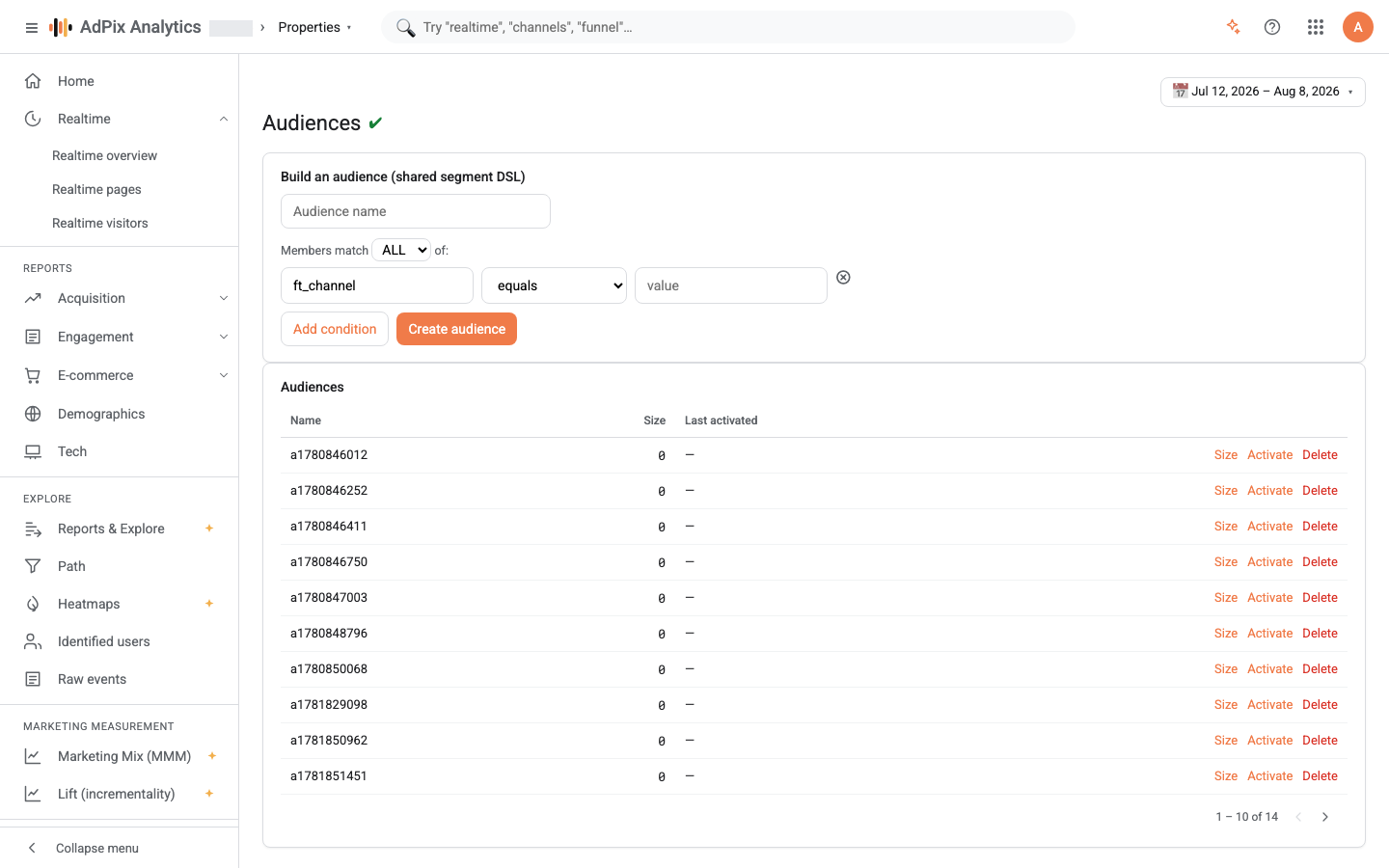
The card at the top of the page, Build an audience (shared segment DSL), uses the same condition language as segments.
The field is an empty text box, not a dropdown — you have to type the exact field name. These are the base fields:
| Group | Fields |
|---|---|
| First touch | ft_channel, ft_source, ft_medium, ft_campaign, ft_term, ft_content |
| Last touch | lt_channel, lt_source, lt_medium, lt_campaign |
| Event | event_name, event_type, page_path, page_title, referrer_url |
| Geography | geo_country, geo_region, geo_city |
| Technology | ua_browser, ua_os, ua_device_class |
Any custom dimension defined on the property works under its own name too. The operators are the ones in the list: equals, does not equal, contains, does not contain, begins with, ends with, matches regex, greater than and less than. The last two read the value as a number; non-numeric text counts as zero.
Misspell a field name — ft_chanel instead of ft_channel — and you get neither an error nor a warning. That condition is removed from the definition. If it was your only condition, the audience becomes every identified user on the property, and activating it ships your whole customer base to the CRM. Select Size before every activation, and believe the number.
What membership actually means#
No membership list is stored. Every time you select Size or Activate, the conditions run against the property's data at that moment. Four things determine the behaviour:
- Identified users only. The count is over the global user ID, so a visitor not yet linked to a real user is never a member. How that link is made is covered in How AdPix identifies visitors.
- A fixed 30-day window. Size and activation always look at the last 30 days and ignore the date picker at the top of the page. Somebody who bought 40 days ago and has not returned is not a member.
- Conditions combine on one event. With ALL, every condition must hold on a single event row, not across the user's history. "channel equals
Paid Searchand page equals/pricing" means the user has one event carrying both — it does not mean "arrived from the ad and later viewed the pricing page". For that logic use ANY, or build two audiences. - The size number is a record. The Size column is the last value computed, not a live figure. It does not change until you select Size again.
Destinations#
A destination is created at organisation level and comes in three shapes:
| Type | What it receives |
|---|---|
| Generic webhook | a POST with a JSON body to your URL |
| WHMCS — companion addon | the same body, to the addon's receiver on your WHMCS install |
| WHMCS — admin API | a call to WHMCS's own API that writes the client's custom fields |
The picker shown at activation lists only enabled destinations, and the destination has to belong to the property's own organisation — otherwise the request is refused with a 403. Method, custom headers and HMAC signing are supported on destinations too, but the console's Add destination form only takes the URL and the shared secret; the rest is set through the API. Details in Webhooks and HMAC signing.
Activation and what gets delivered#
Select Activate on the audience's row, pick a destination and confirm. AdPix computes the members, pulls each one's CRM identifiers from the identity record, and queues a separate delivery per member. The success message reports how many members were queued and the Last activated column updates.
Each delivery carries a body shaped like this:
That is the whole body: membership. Attribution, order value and first/last touch travel in business-event payloads, not here.
Each activation takes at most five thousand members. If the audience is larger, the rest are silently left behind and the success message does not report a bigger number either. For larger groups, split the audience into slices with narrower conditions.
Activation is a one-shot export, not a sync. Somebody who has left the audience receives nothing; somebody sent last time is sent again on the next activation, under a fresh idempotency key. Your receiver must be idempotent on global_user_id.
Delivery guarantees#
Delivery runs through the transactional outbox — the same path business events take to the CRM. A receiver being briefly down therefore does not lose data:
| Subject | Behaviour |
|---|---|
| Queue write | transactional; the activation succeeds once the rows are queued |
| Drain cycle | every two seconds, up to fifty ready rows per pass |
| Success | any response under 300 |
| Failure | up to twelve attempts, exponential backoff capped at one hour |
| After the last attempt | the row moves to the dead-letter queue and is never sent again |
| A stuck row | a delivery left in flight for more than twenty minutes becomes retryable |
Delivery is at least once. The queue guarantees a delivery is never queued twice, not that it is never sent twice — if your receiver returns 200 and the connection drops before the response lands, the same row goes again. Each request times out after fifteen seconds.
Every successful delivery is recorded with its status code and response time, so if a receiver claims it never saw something, you can prove AdPix sent it.
Deleting a destination also deletes its pending deliveries. If your receiver was down for a few hours and you delete and recreate the destination, those rows do not come back. To pause, switch the destination's status off instead of deleting it.
Deleting an audience#
Delete on an audience's row removes the definition only. Whatever was already delivered stays in your CRM, and AdPix sends no "remove me" message. Clearing the group on the receiving side is your job.
Frequently asked questions#
Is activation a continuous sync?
No. Each time you select Activate, members are recomputed at that moment and a fresh delivery is queued per member. Someone who has left the audience gets no removal message, and someone sent last time is sent again. Your receiver must be idempotent on the global user ID.
Why doesn't the audience size match the date range at the top of the page?
Because size and activation ignore your selected range and always evaluate the last 30 days. The date picker at the top of the page has no effect on that number.
Why does my audience return every user?
Most likely a misspelled field name. A condition whose field is not recognised is dropped silently, and if every condition is dropped the audience becomes "any identified user". Always select Size before activating.
Can an anonymous visitor be a member?
No. Membership is computed on the global user ID, so only people linked to a real user qualify — through a sign-in, an email, a phone number or a CRM customer ID.
Thanks — your feedback helps us improve the docs.