Alerts and webhooks
Build a notification channel once, then attach as many alerts as you like to it. A webhook channel takes a method, authentication, custom headers and HMAC signing, so any automation platform can be the receiver.
Two separate things: a channel and an alert#
In the sidebar, under Configure, the Alerts page lives at /alerts. It has two cards, and their order is the order you should work in:
- Notification channels — where the notification goes. Created once, shared across alerts.
- Alerts — a condition measured against the property's data, attached to one or more channels.
The split is deliberate: enter the ops team's webhook URL once and ten alerts point at it. Changing the URL is then a single edit.
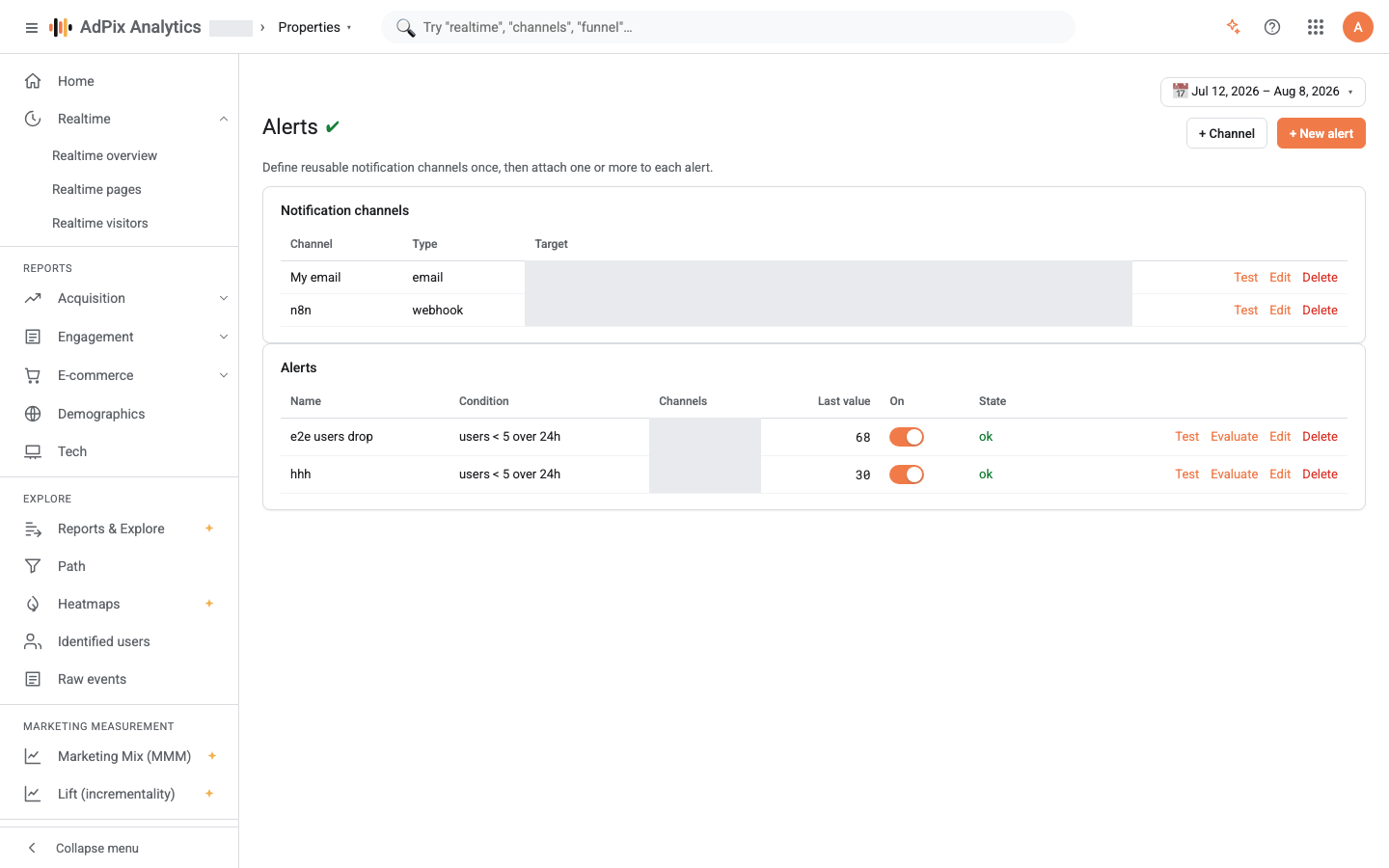
The first time you open the page, if no channel exists, AdPix creates an email channel named My email addressed to you, so you can build your first alert with no setup at all. Rename it with Edit.
Create a channel#
Deleting a channel detaches it from every alert that used it; the alerts survive, without a channel. An alert with no channel still evaluates and still updates its row — it just notifies nobody.
The webhook channel#
For type Webhook, the New channel drawer takes everything an automation platform needs:
| Field | What it does |
|---|---|
| Webhook URL | where the request goes |
| Method | one of POST (default), GET, PUT, PATCH, DELETE |
| Authentication | None, Bearer token, Basic (user/pass) or Custom header |
| Custom headers | one Key: Value per line — for tagging an environment or routing internally |
| HMAC signing | the key the body is signed with; leave blank to disable |
Custom header covers every scheme Bearer and Basic do not — X-API-Key, for instance. The header name is required; without it the save is rejected.
Once a signing key is set, every request that carries a body also carries these two headers:
The signature is HMAC-SHA256 over the raw body bytes. GET and DELETE carry no body, so they carry no signature — pick one of those methods while waiting for a signature and it will never arrive. Verification code in three languages, and how this path differs from outbound destinations, is in Webhooks and HMAC signing.
Each request times out after eight seconds. If your receiver does heavy work before responding, AdPix counts it as a failure and sends again while the first run is still finishing. Queue the event on your side, return 200, then process.
Create an alert#
Five metrics are available, and each counts exactly this:
| Metric | What is counted |
|---|---|
| Users | unique identified users in the window |
| Sessions | unique sessions |
| Events | every event |
| Key events (conversions) | only events registered as key events on the property |
| Revenue | the summed value of purchase events |
If the property has no key events registered, the Key events (conversions) metric returns zero — it does not error. Any "drops below" condition on such an alert breaches on the first evaluation and notifies. Register your conversions first, in Key events.
Window is in hours and defines a rolling span: N hours back from the moment of evaluation. That span is deliberately computed in UTC and does not follow the property's calendar day — unlike reports, where every window bound and bucket is evaluated in the property's timezone. For "the last 24 hours" it makes no difference; if you expected "yesterday", it does.
Evaluation: when it actually happens#
This is the most important thing on the page, and the easiest to misread.
An alert is measured when someone selects Evaluate on its row, or when your own system calls the same API path. AdPix does not schedule alerts in this release. The On switch stores the alert's state and the Last value and State columns show the result of the last evaluation, but nothing inside the product drives the cycle. If you want alerts to work without you, run a scheduled job on your side that calls the same evaluate path.
Each evaluation goes in this order:
Step three is what stops a notification flood: a message is sent only on the transition from ok to breached. While the alert stays breached, later evaluations are silent. The return-to-ok message is sent only if you chose Breach + recovery.
Retry when the receiver does not answer#
An alert webhook is attempted up to three times in the moment, with a short pause between attempts. The rule is simple:
| Receiver's response | What happens |
|---|---|
under 300 |
delivered; done |
300–499 |
terminal, no retry — repeating will not fix this |
5xx or a network error |
retried, up to three attempts |
After the third failure only a line in the server log remains; the console shows nothing. An alert notification is not held in a queue and is not sent again later. That differs from outbound destinations, which have a durable queue and a dead-letter queue — see Audiences and destinations.
Test before you depend on it#
There are two Test buttons on the page and they do different things:
- Test on a channel row sends a sample notification through that channel alone. That is enough to check the URL, the authentication and the signature.
- Test on an alert row sends the same sample through every channel attached to that alert, and the success message reports how many emails it reached and whether a webhook was used. With no channel attached it returns an error.
Both sample messages label themselves as a test, so nobody mistakes one for a real breach. A test does not touch the alert's state.
Evaluate is a different thing: it really computes the metric, writes the state, and — if the state changed — sends a real notification. Use Test to check a channel, not Evaluate.
Who can do what#
| Action | Requires |
|---|---|
| Seeing the page and the alert list | report-read access on the property |
| Creating, editing or deleting a channel | the edit-audiences capability |
| Creating, editing or deleting an alert | the build-exploration capability |
| Selecting Evaluate or Test | report-read access |
Creating, editing and deleting alerts and channels is recorded in the audit log. The Alerts item itself only appears in the sidebar for someone who holds the edit-audiences capability.
Frequently asked questions#
Do alerts run on a schedule?
Not in this release. An alert is evaluated when you select Evaluate on its row, or when your own system calls the same API path. The On switch stores the alert's state, but nothing inside AdPix drives the cycle. Until built-in scheduling ships, run a cron job on your side.
Why is my key-events alert permanently breached?
Because the property has no key events registered. With an empty key-event list the metric evaluates to zero rather than erroring, so any "drops below" condition breaches on the first evaluation. Register your conversions first, then build the alert.
Is the 24-hour window evaluated in the property's timezone?
No. An alert window is rolling — N hours back from the moment of evaluation — and is deliberately computed in UTC, not against the property's calendar day. Reports are the opposite: every window bound and bucket there is evaluated in the property's timezone.
Will I be notified again while the problem continues?
No. A notification is sent only on a state change, from ok to breached. While the alert stays breached, later evaluations are silent. A recovery notification arrives only if you picked Breach + recovery.
Thanks — your feedback helps us improve the docs.