Library
Named collections of reports: group the handful of screens a team or a recurring review always looks at together, so nobody has to hunt through the menu for them. A premium feature, and creating one needs analyst access.
What the Library is, and is not#
Library, at /library, is a simple thing: named collections of reports. Create "Weekly marketing review", put the four screens you open every Monday into it, and from then on those four are one named unit in the console instead of four scattered menu items.
What it is not is a saved report in the sense of a saved query. A collection holds no filter, no dimension, no metric and no date range. It holds links.
It sits in the sidebar under the Configure group. From Admin you reach the same screen under Library (report collections).
Library is not included in the Free plan. If the property you have switched to is on Free, the menu item carries a premium badge and the page shows an upgrade card instead of the collections list. See Plans and entitlements.
Create a collection#
The name is required; without it nothing is created. A collection with no reports in it is allowed. There is no way to edit an existing collection on this screen — build a new one with the right set and delete the old one.
Eight reports can be picked. The chips are labelled with the path itself, not the page's display name:
| Path | Page in the console |
|---|---|
/ |
Home |
/acquisition |
Acquisition overview |
/engagement |
Engagement |
/funnel |
Funnel |
/attribution |
Attribution |
/path |
Path |
/cohort |
Cohort retention |
/lifetime |
Lifetime value |
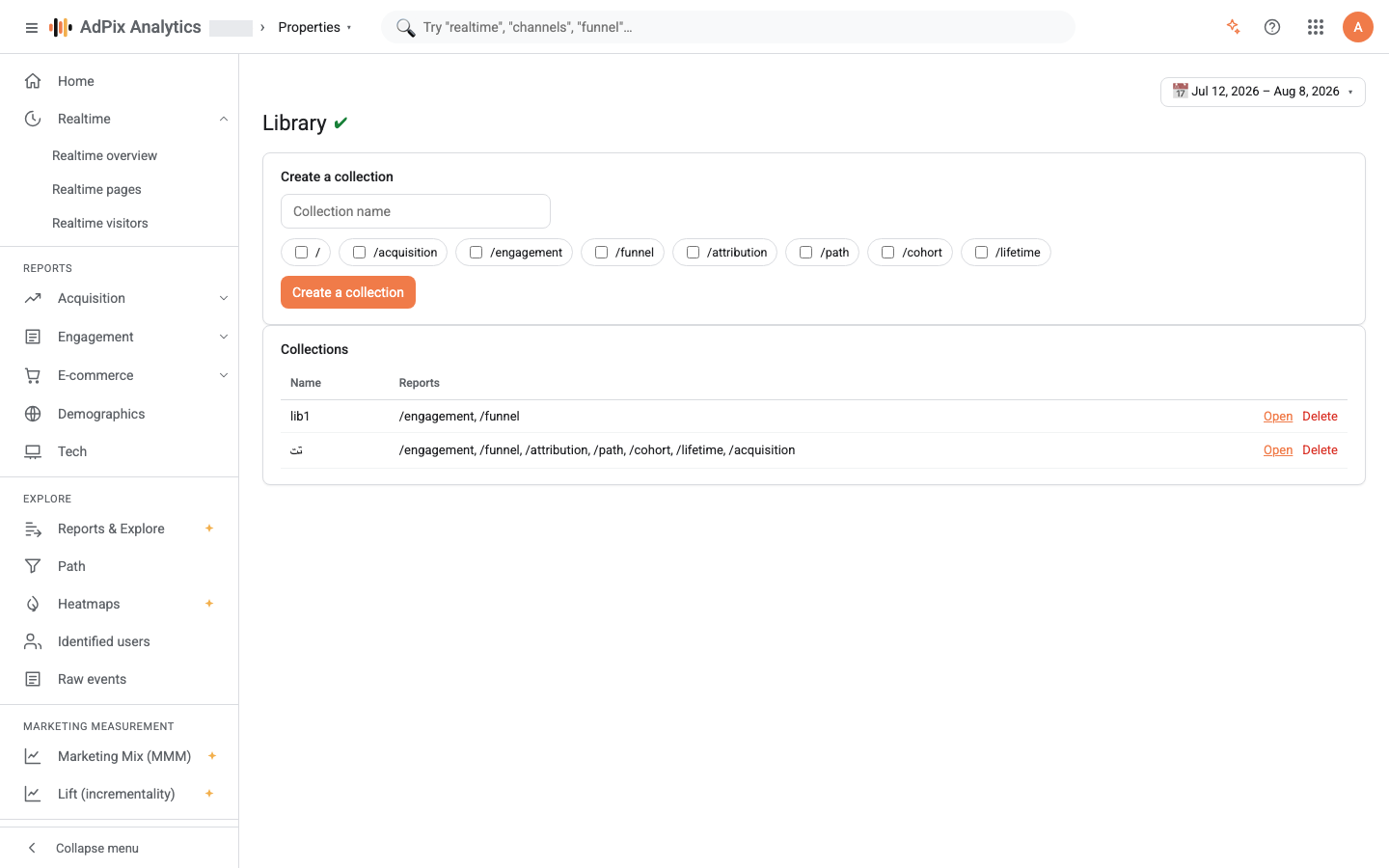
The Collections card below lists each collection with its name and its reports. A row's Open link opens the first report in that collection; the rest are visible in the same column.
The Delete link acts immediately — there is no confirmation dialog. Collections are not recoverable and have to be rebuilt. (The reports themselves are untouched; what is deleted is only the list of links.)
Who sees, who creates#
These are not the same thing, which is the usual source of confusion.
| Action | What it needs |
|---|---|
| Seeing a property's collections | report-read access on that property, plus the Library feature entitled by the property's plan |
| Seeing Library in the sidebar | permission to author reports and explorations — analyst level and above |
| Creating or deleting a collection | the same authoring permission |
Collections belong to the property, not to their author. There are no private collections: anyone with access to that property sees all of them. Nor are collections shared between properties — switch the active property and you see a different list.
Every creation is written to the change history, so who created a collection and when stays answerable afterwards.
Collection versus saved exploration#
Both are "saving", and they save two entirely different things.
| Library collection | Saved exploration | |
|---|---|---|
| Built in | Library | Reports & Explore |
| What is stored | a name plus links to report pages | the full query definition: dimensions, a pivot column, metrics, a segment and the visualisation |
| What opening it does | opens that report page with your current settings | re-runs the saved question against today's data |
| Date range | not stored | not stored; the picker's range applies |
| Good for | grouping standard screens under one name | keeping an analysis you built, to run it again |
The simple rule: to save where to look, build a collection. To save how to look, save an exploration.
Opening a report from a collection keeps whatever range you currently have selected. If everyone on the team needs to see the same picture, state the range explicitly in your own message — the collection does not carry it.
Frequently asked questions#
What exactly is stored in a collection?
A name and a list of links to report pages. Filters, date range, dimensions and metrics are not stored. Opening a report from a collection opens it with your current settings, not the settings you had when you built the collection.
Who can see a collection I create?
Collections belong to the property, not to a user. Anyone with report-read access on that property, with the Library feature entitled, sees every collection on it. There are no private collections, and a collection is never shared between properties.
How is a collection different from a saved exploration?
An exploration is a saved question — it keeps dimensions, metrics, a segment and the visualisation, and re-runs when reopened. A collection is a folder of links; no query is stored in it.
Why can't I see Library in the menu?
Two possible reasons. Library is a premium feature, so on a Free-plan property it carries a premium badge or shows the upgrade screen. Separately, the menu item is only shown to people allowed to author reports and explorations — analyst level and above.
Thanks — your feedback helps us improve the docs.