The E-commerce report
Revenue, orders, average order value, top products and the purchase funnel — all built from the line items of the orders you send. Money is kept in the currency it was received in and is never converted to another one.
What feeds this report#
Every purchase or refund event you send writes one row per line item into the order-items store. This is the only report that reads those rows — every other report sees the same event merely as an event carrying a value parameter.
Two paths produce them, and both land in the same place:
- The browser, through
ap('ecommerce', name, {...}), for the pre-purchase funnel: product views, add to cart, begin checkout. - Your server, through the server-to-server API, for the purchase and refund themselves. That path cannot be blocked by an ad blocker, does not get lost in a payment-gateway redirect, and guarantees an order is not counted twice. For money, prefer it.
Both commands are documented in e-commerce events and server-side tracking.
The cards at the top#
The range is whatever you selected in the date picker, with its bounds evaluated in the property's time zone.
| Card | Exact definition |
|---|---|
| Revenue | The sum of purchase order values in the range, once per transaction ID. |
| Orders | The number of unique transaction IDs with a purchase event. |
| AOV | Revenue divided by orders. |
| Units | The total item quantity across all orders. |
| Items / order | Units divided by orders. |
| Refunds | The value of refund events in the same range. |
"Once per transaction ID" is the most important line in that table. The order's total value repeats on every line item; summed naively, a three-item order would be counted three times. So the items of each order are collapsed to one row first, and only then is the money counted.
The refunds card shows the refunded amount only; it is not subtracted from the revenue card. Work out net revenue from the difference yourself.
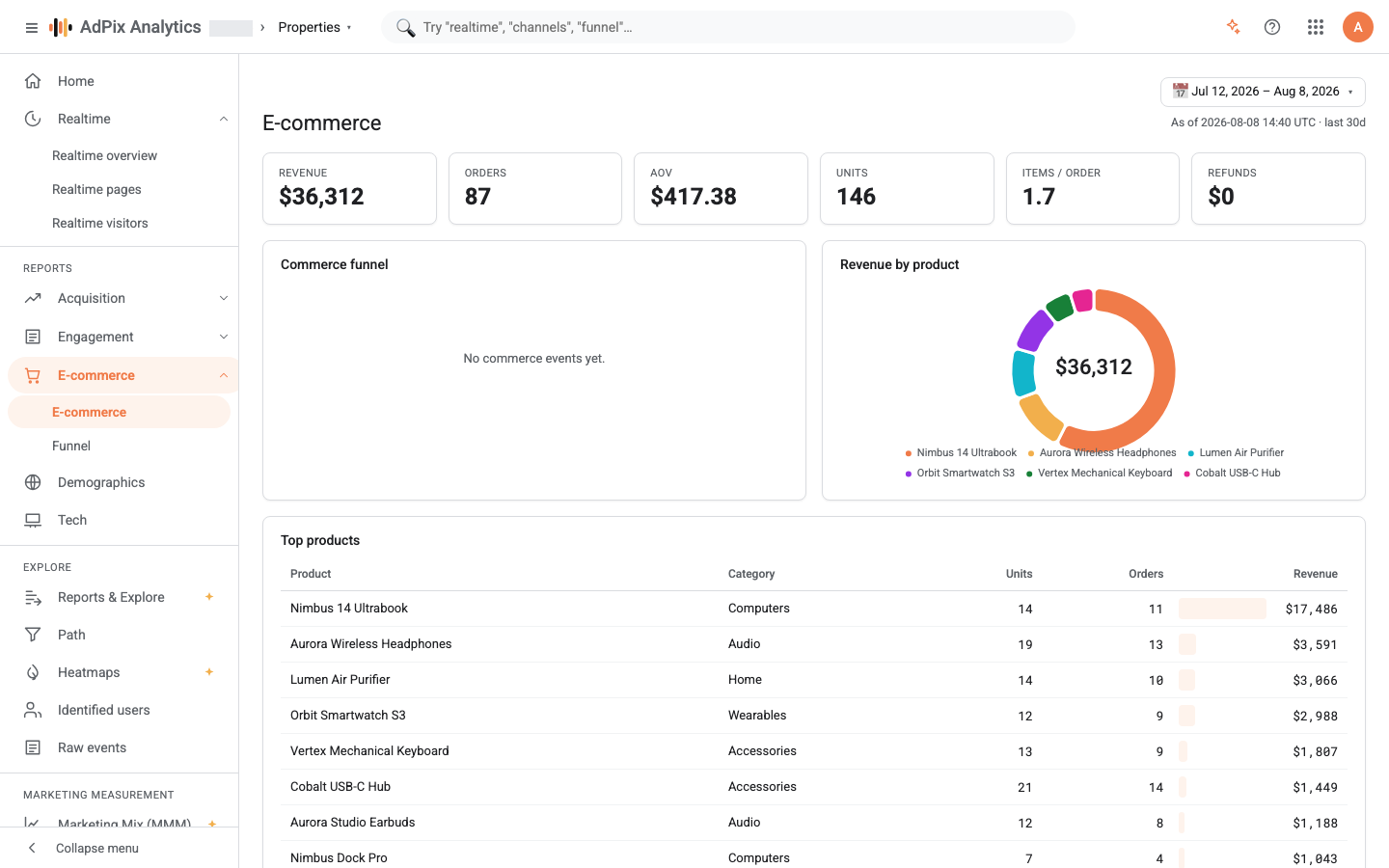
Each order's currency is stored as received and no exchange rate is ever applied. If your property takes more than one currency, a single revenue figure adds unlike units — not merely imprecise, but meaningless. The service does return revenue broken down per currency and flags a mixed set with mixed_currency, but the cards on this page still render one combined figure. The operational fix: one property per currency.
The corner of the page still prints a caption mentioning the last 30 days. That text is left over from when this report had a fixed window. Today the real range is the one selected in the date picker.
The purchase funnel#
The funnel has four fixed steps, and each step's name is the standard event name you are expected to send:
| Step | Event |
|---|---|
| View item | view_item |
| Add to cart | add_to_cart |
| Begin checkout | begin_checkout |
| Purchase | purchase |
Each step is the number of unique visitors who fired that event in the range, and the percentage beside it is that step's share of the first step.
Two things will mislead you if you do not know them:
- The steps are not checked as a sequence. Someone who went straight from an ad into the cart without ever seeing a product page is counted in Add to cart but not in the first step. That is why a later step can be larger than the one before it. For a funnel that really respects order and whose steps you choose, use the conversion funnel.
- The percentages are based on the first step. If you do not send
view_item, every percentage stays at zero even while you are making sales.
If none of those four events arrived in the range, you get "No commerce events yet" instead of the chart.
Top products#
The products table groups line items by product ID and sorts by revenue, up to 50 products. The donut beside it shows the six highest-revenue products.
| Column | Meaning |
|---|---|
| Product | The item name; if you send no name, the product ID takes its place. |
| Category | The item's category, exactly as you sent it. |
| Units | The total quantity sold. |
| Orders | The number of distinct orders this product appeared in. |
| Revenue | The item's own revenue: price × quantity, minus discount. |
So a product's revenue is its share of the basket, not the value of the order it appeared in. The sum of all product revenue will not match the revenue card if you include shipping or tax in the order value.
Grouping is done on the product ID, not the name. Rename a product and its history survives; change its ID and it becomes two separate products.
Duplicates and the accuracy of the numbers#
Line-item rows are keyed on the event ID and the item ID, and each row carries a version number. If the same event arrives again, the newer version replaces the old one and nothing is counted twice on read. The server-to-server path adds a stronger layer: the event ID you choose — order_10482, for instance — guarantees that a retry or a re-run of a queue does not create a second order.
If you send the same order from both the browser and your server, you get two separate transactions, because the two paths mint different IDs. Pick one path for purchases and stay on it.
When the page is empty#
purchase. Other names are still recorded as events, but they never reach this report.transaction_id. Without it, there is no order to count.items array. Without it, top products and the unit count stay empty even when revenue is recorded.anonymous_id with it so the order attaches to the person who walked the funnel.Frequently asked questions#
Revenue here differs from the revenue in the Events report. Which one is right?
Both, but they count different things. Events sums the raw value parameter across all events; E-commerce counts an order's value exactly once per transaction ID, even when the order has ten line items. For sales revenue, take the number on this page.
I sell in both rials and dollars. What does the revenue figure mean?
Nothing useful. AdPix does not convert currencies and stores each order in its native one, so a single card in that situation adds unlike units. The service does return revenue split per currency and flags the mix, but the simplest correct answer is one property per currency.
The purchase funnel is all zeros even though I have sales. Why?
Because the funnel's percentages are computed against the first step, view_item. If you never send the product-view event, the base of the percentage is zero. Start sending the event on your product pages and the funnel becomes meaningful.
I sent an order twice. Is it counted twice?
No. Line items are keyed on the event ID and the item ID and the duplicate collapses on read. The order value is also read once per transaction ID rather than once per line item.
Thanks — your feedback helps us improve the docs.