Custom definitions
Every parameter you send with an event is stored, but until you register it, it appears in no pick list anywhere. A custom definition turns that key into a selectable dimension or metric — with no reprocessing and no change to collection.
What a custom definition actually does#
When you send an event with ap('track', …), its property object is stored verbatim as JSON alongside the event. Nothing is lost — but nothing surfaces in reports automatically either, because AdPix has no way to know which key is worth grouping by and which one is just your internal id.
A custom definition is that mapping: "treat the plan key in props as a selectable dimension." From then on, any query asking for that dimension pulls the value out of the event's JSON at read time.
Two practical consequences follow from that design:
- There is no reprocessing job. Create the definition now, run the report now.
- A definition creates no data. If the event never carried the parameter, no registration can invent it.
Registering makes a parameter that stored events already carry readable — in that sense it applies to existing data. But events that did not carry the parameter when they were sent stay empty forever. The right order is: start sending the parameter, then register it.
Create a definition#
plan, for example.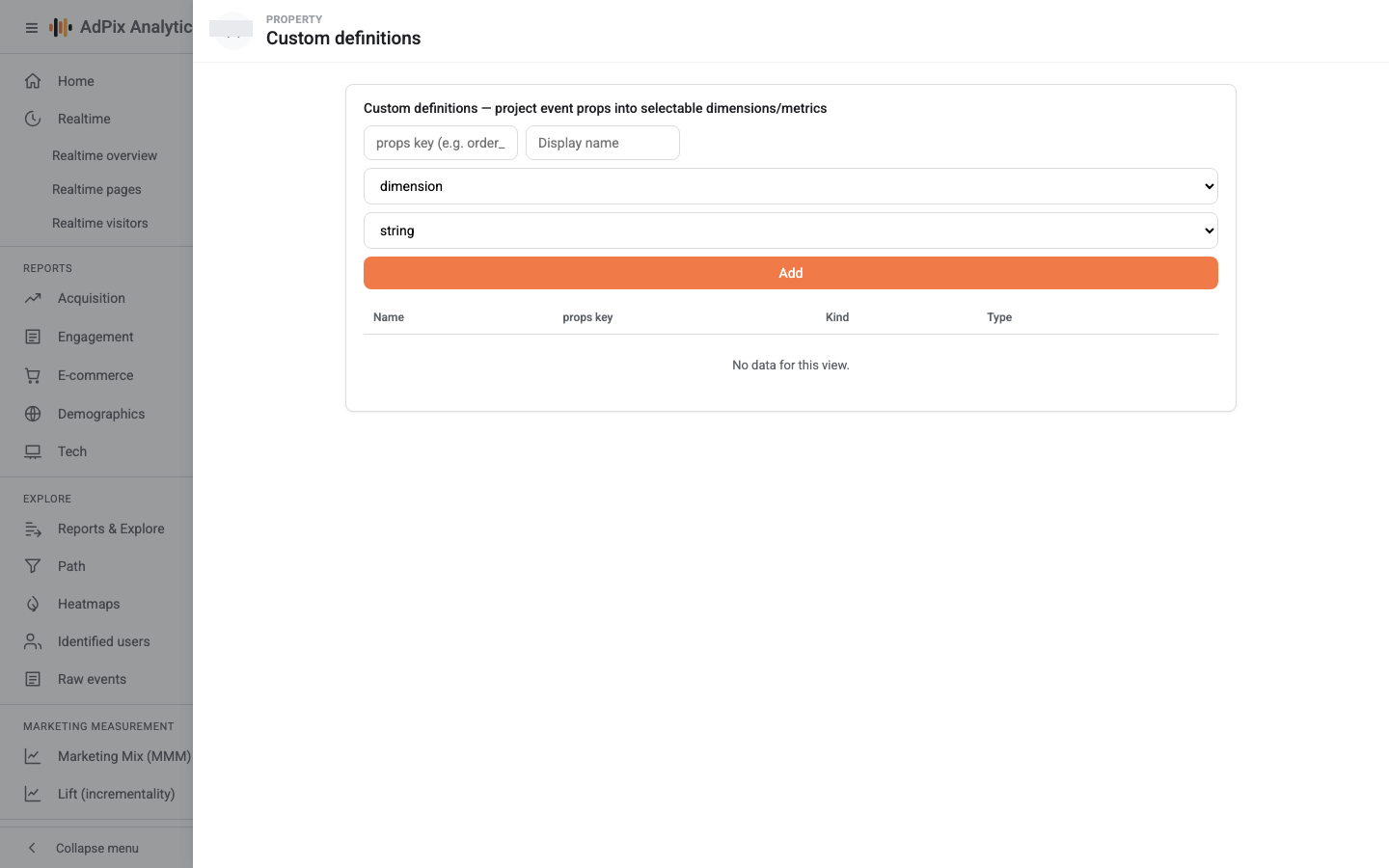
Each row of the table is one mapping: props key, display name, kind and type. Adding the same key again does not create a duplicate row — it updates the display name and type of the existing one. Remove drops only the mapping; the values stay on the events, and you can register the key again at any time.
Creating and removing definitions takes Analyst or above. Reading the list works with view access.
Type decides, not the Kind column#
This is the one place the form can mislead you. What governs behaviour is Type:
| Type | What it creates | How it appears in Explore |
|---|---|---|
| string | one dimension (to group by) | a chip in the Dimensions list |
| number | two metrics: sum and average | two chips in the Metrics list |
Set Kind to "metric" but leave Type as "string" and you get a dimension. For anything you want summed or averaged — an amount, a count, a score — pick number.
A second note about the key itself: only letters, digits, underscore and dot are valid, and anything longer than 64 characters is truncated. A key such as order-id, or one containing a space, never reaches the matching key inside the event and always comes back empty. Send flat values too (text or number), not nested objects.
Where custom definitions are used#
Custom definitions do not appear in the standard reports — Home, Acquisition, Traffic, Engagement, Events, E-commerce. They live one level up, in the explore surfaces:
| Where | How it is used |
|---|---|
| Reports & Explore | dimension and metric chips in the variables panel; up to 3 dimensions and 4 metrics at once |
| Audiences | as a condition field — you type the field name yourself |
| Path exploration, Segment overlap, User lifetime | as a grouping dimension or inside a segment condition |
In the variables panel the chip label is built from the props key, not from the display name: underscores become spaces, and a numeric definition shows up as sum · order total and avg · order total.
Know one exception so you do not waste time on it: the Segments builder picks its field from a fixed list of built-in dimensions, and custom dimensions are not on that list. Build a condition on a custom dimension in the Audiences builder instead, where the field name is a free-text input.
Access to Reports & Explore is one of the plan-dependent features. Creating a definition on the admin pane always works, but if the explore page is locked for that property, a new definition has nowhere to be read. The mechanics are in roles and data restrictions.
Cardinality: which keys not to register#
Every distinct value of a dimension becomes one row in the result. That is the only real cost of a custom definition, and on a high-variety key it gets expensive fast.
The explore query orders rows by the first metric, descending, and cuts there; the number you pick under Show rows is the limit on the query itself, not just on the display. There is no "(others)" row — the tail is neither summed nor shown, so the column total in the table is not the real total.
| Register these | Do not register these |
|---|---|
plan, category, payment_method, logged_in, ab_variant |
order_id, transaction_id, email, session_key, any unique id |
The rule of thumb: if you do not expect the same value to repeat across dozens of events, it is not a dimension. For unique ids use the transactional reports, not a grouping.
Event scope and user scope#
A value is always read from the event that carries it. The admin pane creates event-scoped definitions, and at read time the mapping is found by parameter name.
Watch what that means in practice. If you send an attribute only once — with ap('identify', …), say — that value sits on that one event alone. Group page views by it afterwards and almost everything lands in the empty bucket.
Two correct ways out:
- send the parameter on the very events you want to break down — the reliable route;
- or, instead of grouping, build an audience whose condition is on that custom dimension. Audience membership is user-level: one matching event is enough for the user to join.
A parameter you did not send yourself#
Not every parameter has to come from the site. Event rules can write a parameter onto an event, or rewrite its value, at the moment it is received; the result lands in the same props and is registrable like any other. That is the usual way to normalize messy values arriving from several site templates — see event rules.
Frequently asked questions#
I created a custom dimension but its column is empty. Why?
Either those events do not carry the parameter, or the key does not match exactly. The value is pulled straight out of the event at read time, so an event without the parameter returns an empty value. The key is case-sensitive and only letters, digits, underscore and dot are valid in it.
Does registering a definition create historical data?
No. Registering creates no data at all. It only makes a parameter that stored events already carry selectable. Events recorded before you started sending that parameter stay empty forever, and no setting brings them back.
Why is my display name not shown in Reports & Explore?
The dimension and metric list in the explore variables panel is built from the props key itself, not from the display name. The display name appears only in the table on this admin pane. So pick a key that reads well on its own.
What is the difference between Kind and Type?
Type is what actually decides. Number turns the definition into a sum and an average metric; string turns it into a dimension. Kind is only a label carried in the table.
Thanks — your feedback helps us improve the docs.